
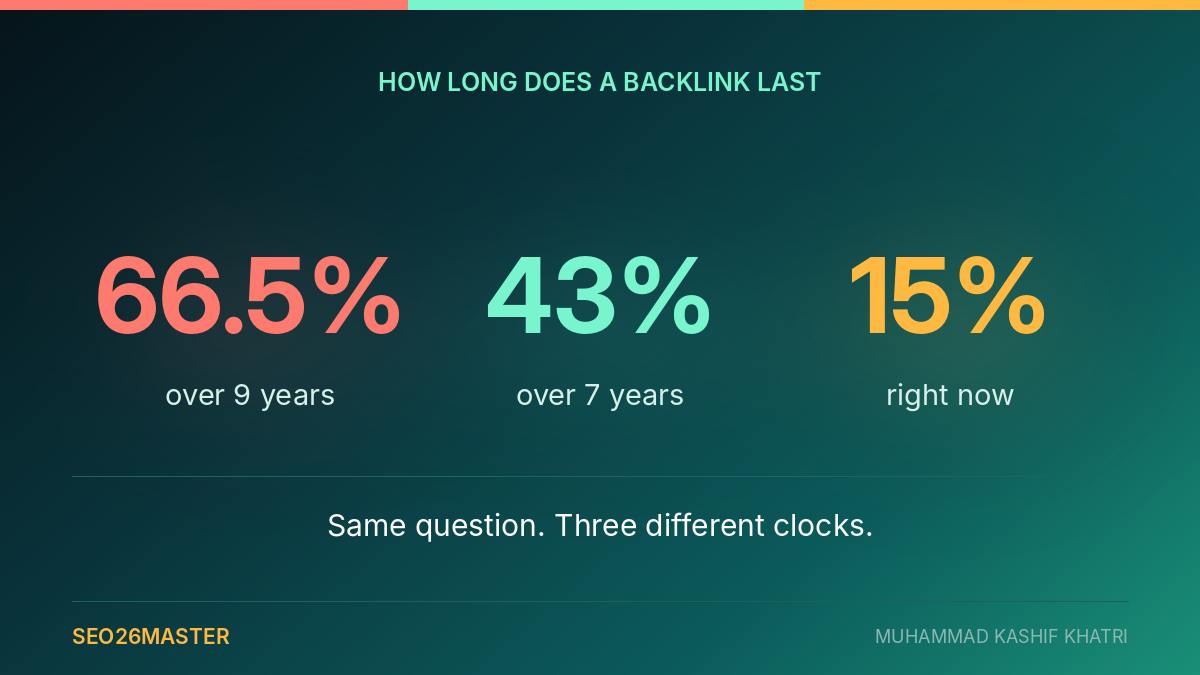
Three serious studies have measured how many backlinks die. They give three completely different answers.
Ahrefs says 66.5%.
Linkody says 43.39%.
Suff Digital says 15.1%.
Those are not small differences. One of them is more than four times another. And every page that quotes one of them quotes it as if it were the answer.
They are all correct. They are measuring different things over different periods, and once you see what each one actually counted, the useful question changes. It stops being how many links die. It becomes how fast, and which ones.
This page answers that, and then shows you how to check if a backlink is live in about thirty seconds, including the three checks that most people skip.
What the pages ranking for this question tell you
Before writing this I opened the pages that come back for this search. I wanted to know what a person actually finds when they go looking.
Here is what is there.
SeoMods, written by Yusuf DİNÇER, published 22 June 2026, around 1,750 words. It points you at its own free checker. It says your link list should start from the Google Search Console links report, which is right. It also separates whether a link is live from whether it is followed. That last part is good, and most pages do not do it.
S9 Consulting, credited to Carlos Cortez, published 3 July 2026. Five steps, built around uploading a spreadsheet of your links to a checking tool. It treats live, followed and indexed as three separate questions, which is the right shape.
FindGreatSites, by Benjamin Huet, published 28 August 2026. This is the best of the four. It gives a five step workflow. It checks the link's code by hand and searches Google to see whether the page is indexed. It also says plainly that the indexing check tells you nothing about whether the link is followed.
OutreachDesk, a free tool page. You paste in the addresses of up to 100 pages your links are supposed to be on, plus your own page address, and it tells you Found or Not Found for each. No signup, nothing to install. It is genuinely useful and I will come back to it.
| Page | Published | Gives a method | Separates live, followed, indexed | Cites any data |
|---|---|---|---|---|
| SeoMods | 22 June 2026 | yes, via its own tool | live and followed only | no |
| S9 Consulting | 3 July 2026 | yes, five steps | yes | no |
| FindGreatSites | 28 August 2026 | yes, five steps | yes, all three | no |
| OutreachDesk | tool page | bulk checking only | no | no |
Now the part that matters.
Not one of those four pages cites a single study, percentage or named source about how often backlinks disappear.
All four say links disappear. SeoMods says they get lost to redesigns and deleted articles. S9 says "sometimes within weeks". OutreachDesk says links "get removed more often than you'd expect". FindGreatSites says directories drop them when they migrate platforms or clear out inactive listings.
Every one of those statements is probably true. None of them is measured. So a reader leaves knowing that links die. They do not know whether that means one in twenty or two in three. They do not know which of their own links are at risk either.
That gap is the whole reason this page exists.
Why three studies give three different answers
Here are the three side by side. As far as I can tell, nobody has put them in the same table before.
| Study | Published | Sample | Period measured | Links lost |
|---|---|---|---|---|
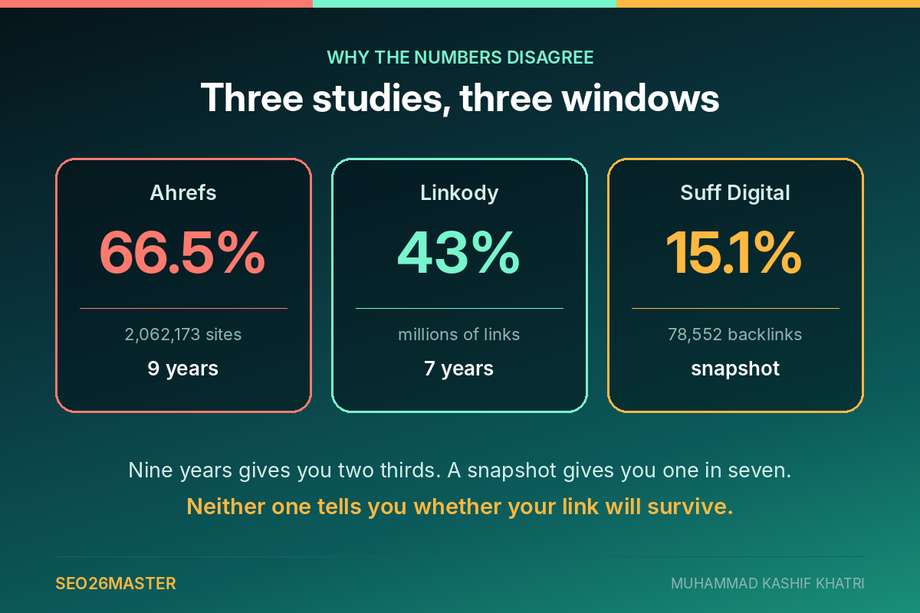
| Ahrefs | 29 April 2022, updated 2 February 2024 | 2,062,173 websites | January 2013 onwards, about 9 years | 66.5% |
| Linkody | 4 October 2022, updated 21 March 2024 | millions of links checked every 24 hours | up to 7 years | 43.39% |
| Suff Digital | 24 September 2026 | 78,552 backlinks to 249 websites | snapshot taken 23 September 2026 | 15.1% of followed links |
Read the fourth column and the contradiction disappears.
Ahrefs measured nine years. Their exact line is that "since January 2013, 66.5% of the links pointing to the 2,062,173 websites we sampled have rotted." Include temporary errors and other issues and their figure reaches 74.5%.
Linkody measured up to seven years and found 43.39% gone at the end of it. They also found that about 8.03% of links break within the first three months, which is the more useful half of their study and the half nobody quotes.
Suff Digital did something different again. They took a snapshot on a single day, 23 September 2026. It covered 78,552 backlinks pointing at 249 randomly chosen United States small business websites across 56 industries. Then they asked how many were marked lost right now. The answer was 15.1% of followed links.
So nine years gives you two thirds. Seven years gives you a little under half. A snapshot of a live profile gives you about one in seven.
None of those numbers is the answer to "will my link survive". They are three different questions wearing the same clothes.
The finding almost nobody repeats
Buried in the Suff Digital data is the single most useful thing I found while researching this.
First, one piece of vocabulary, because the rest of this page needs it. Every link is one of two kinds. A followed link, sometimes called dofollow, tells Google to pass some credit along to the site it points at. A nofollow link tells Google to ignore it. On the page they look exactly the same. The difference is hidden in the code, and I will show you where to find it further down.
Only one of those two is worth paying for. Which makes this next part awkward.
Followed links disappear about five times faster than nofollow links.
15.1% of followed backlinks were gone. Only 3% of nofollow backlinks were gone. Same study, same day, same sample.
Think about what that means. The links that actually do something are the ones that vanish. The links that do nothing sit there for years.
It makes sense once you say it out loud. A followed link usually sits on a page somebody cares about: a commercial page, a resource list, an article that gets rebuilt when the site is redesigned. Somebody owns that page and eventually edits it. A nofollow link usually sits on a forum post, a profile, a comment or a directory entry that nobody will ever touch again.
So the better the link, the shorter its expected life. If you have been treating your followed links as the permanent ones and your nofollow links as the throwaway ones, the data says the opposite.
The same study found an even bigger gap between types of website. Blogs lost 0.9% of their links. Ordinary business websites, the kind that are not really blogs at all, lost 14.1%. That is more than fifteen times the rate. A site that somebody writes on every week rarely tears down its old pages. A company brochure site gets rebuilt from scratch every couple of years, and everything on the old pages goes with it.
128 days, and what that actually costs
Here is the number I keep coming back to.
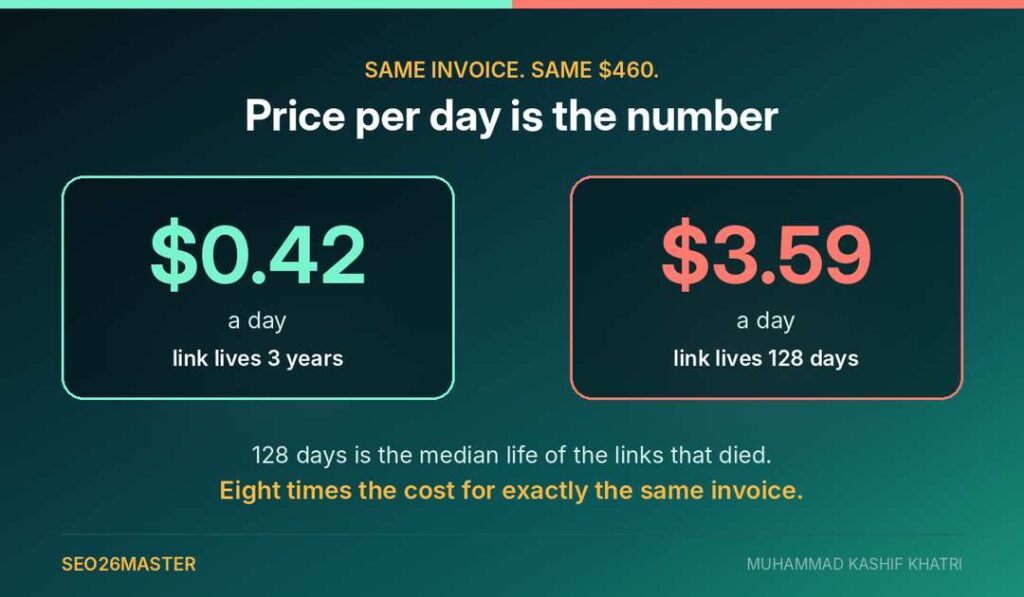
In the Suff Digital data, a lost backlink lasted a median of 128 days.
Median means the middle one. Line up every link that died, youngest to oldest, and the one in the middle had been up for 128 days. That is four months and a week. Half of them did not even last that long.
Now put it next to what people pay. In guest post pricing I went through two independent datasets covering roughly 300,000 websites between them, and both landed on an average guest post price of about $460.
Divide one by the other.
$460 over 128 days is $3.59 a day.
I have not seen anybody do that sum, and I think it is the most honest way to look at a link purchase. You are not buying something you own. You are renting it, for a length of time nobody will tell you, with no refund if it ends early.
That is not an argument against buying placements. I sell them. It is an argument for two things.
Check that what you bought is still there. And stop paying extra for permanence. Nobody selling you a link can promise it, and the data says a good many of them will not deliver it.
Why links die
Both of the large studies broke this down. They do not quite agree, and the disagreement is worth seeing.
Ahrefs found the two main causes were dropped pages at 47.7% and removed links at 34.2%. On their numbers, the biggest single cause is the whole page going away.
Linkody found the opposite order. For them, link removal from the content was the most common cause, at 50.2% of all losses.
So one study says the page usually dies and the other says your link usually gets deleted from a page that is still standing. What they do agree on is the size of that second group. Somewhere between a third and a half of all link loss happens on pages that are still perfectly healthy.
That second group is the one worth worrying about, because it is invisible.
When a page is deleted, the web server says so. That is the "404 page not found" message you have seen a hundred times, and every monitoring tool picks it up automatically.
When a page is edited, the server says nothing. The page loads normally, looks normal, and reports itself as perfectly healthy. Your link is simply not on it any more. No tool shouts, no email arrives, and most people never look again.
How to check if a backlink is live, in about thirty seconds
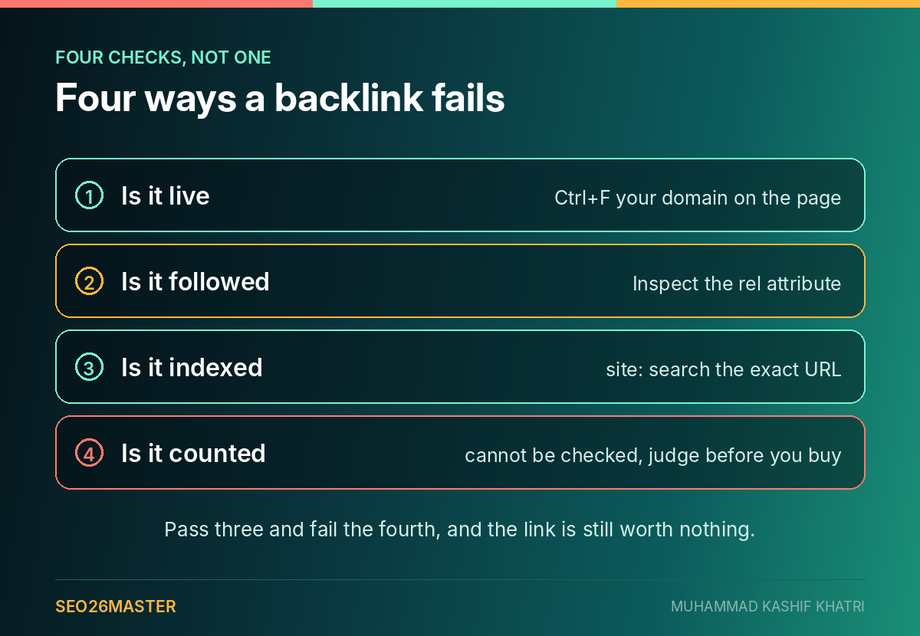
A backlink can fail in four different ways, and they are not the same problem. Checking only the first one is what most people do, and it is why links sit in reports looking healthy for months after they stopped doing anything. Three of the four take seconds. The fourth cannot be checked at all, which is why it comes last.
Check one: is it live
Open the page the link is supposed to be on. The real page, not your tool's record of it.
Press Ctrl+F, or Cmd+F on a Mac, and type your domain.
If your domain appears, the link is live. If it does not, the link is gone. And as the studies above show, there is a very good chance nothing broke at all and somebody simply edited it out.
That is the whole check. It takes about ten seconds and it is more reliable than any dashboard, because you are looking at the page as it exists right now.
Check two: is it followed
This is the followed or nofollow question from earlier, and this is where you find the answer.
It is the check people skip. Given that followed links are also the ones that die fastest, it is the one most worth doing.
Here is how, and it is easier than it sounds.
- Right click directly on the link itself and choose Inspect, or Inspect Element.
- A panel of code opens, usually on the right. The line holding your link is already highlighted for you.
- Look at that highlighted line. It starts with
<a href=followed by your web address. - Now read what comes after your address, before the closing
>.
That last bit is the whole answer.
| What you see | What it means |
|---|---|
| nothing after the address | the link passes credit, which is what you want |
rel="nofollow" | Google is told to pass nothing |
rel="ugc" | marked as a reader comment or forum post, passes nothing |
rel="sponsored" | marked as paid or advertising, passes nothing |
If right clicking does not work on that site, press Ctrl+U to see the page code, then Ctrl+F and search for your domain. The same line will be there.
One warning. A site can switch every outbound link on the whole site to nofollow in one go, by changing a single setting. Every link you ever earned there changes on the same day. Not one page is edited, so nothing looks different, and your backlink tool will not mention it.
This is also the check that decides whether the link was ever the kind of link you were paying for. The difference between the two is the subject of high quality backlinks, and it is worth settling before money changes hands rather than after.
Check three: is the page indexed
A link on a page Google is not indexing does nothing at all, however perfect the link itself is.
Go to Google and type site: followed by the exact page address, with no space after the colon. Like this:
site:example.com/blog/the-article-your-link-is-on
If the page comes back as a result, Google has it. If nothing comes back, Google has either not found the page or chosen not to keep it. Until that changes, your link is sitting in a room with the lights off.
FindGreatSites makes this point well, and adds the warning that matters: this check does not tell you anything about whether the link is followed. The checks are separate for a reason. Pass one, fail another, and you still have nothing.
Check four: is it being counted
No page I read even mentions this one. It is the reason some people tick all three boxes above and still see nothing happen.
A link can be live, followed and on an indexed page, and still pass no value, because Google decided not to count it.
Google has been plain about this. In the December 2022 link spam update announcement they wrote that "ranking may change as spammy links are neutralized and any credit passed by these unnatural links are lost." Their help documentation puts it more bluntly still: "when our systems nullify spammy links, the link credit that was previously generated is lost."
Neutralised is not the same as penalised. Nothing is done to your site. The link simply stops counting, quietly, with no notification anywhere.
You cannot check this one directly. There is no tool that reports it and there never will be, because Google does not publish which links it counts. What you can do is check the thing that predicts it, which is the site the link sits on. If the page exists mainly to carry outbound links, the link is a candidate for being ignored no matter how healthy it looks. I went through the signals in how to spot a link farm, and the policy wording itself in what Google counts as a link scheme.
The practical version is short. Three checks tell you whether the link exists and can be seen. The fourth tells you whether it was ever going to matter, and the only place to answer it is before you buy.
Why your tool says the link is live when it is not
This is the part that catches people out, and it has a simple explanation.
Your backlink tool is not looking at the page right now. It is telling you what it saw the last time it crawled that page.
S9 Consulting quote a figure in their own guide that makes the scale clear: about 58% of SE Ranking's backlinks are updated every 90 days. That is a reasonable refresh rate for a database of that size. It also means roughly four in ten records are older than three months.
So "live" in a dashboard often means "live when we last looked, which might have been in July".
The Suff Digital method shows the same thing from the other side. They recorded, for every link, the date it was first found and the date it was last seen. A link only counts as lost when "the page no longer carries it or the page itself is gone".
So there is always a gap between the day a link actually died and the day anybody noticed. During that gap your report says everything is fine. It is wrong, and nothing on your screen tells you so.
This is not a reason to distrust the tools. It is a reason to open the page yourself for the links that matter. Thirty seconds on a link you paid $460 for is not a lot to ask.
Which of your links are most at risk
You cannot check everything every week. So check the ones most likely to be gone.
Based on what the three studies actually measured, these are the ones to look at first.
| Risk factor | What the data says |
|---|---|
| Followed links | 15.1% gone against 3% for nofollow, five times the rate |
| Links under four months old | median lost link lasted 128 days, and 8.03% break within the first three months |
| Links on smaller, weaker sites | sites under a Moz Domain Authority of 45 lost 16% of their links in the first year alone |
| Links on business sites rather than blogs | ordinary business websites lost 14.1% against 0.9% for blogs |
| Links on pages that were rebuilt or redesigned | pages being deleted outright accounts for 47.7% of all losses |
One note on that third row. Linkody's own data shows that weaker sites lose links faster. But the takeaway at the end of their article says backlinks decay "regardless of a website's size and authority". Their data and their conclusion do not agree. I am going with the data.
If you only have time for one pass, do this. Take everything you paid for in the last six months. Sort it by whether the link is followed, and check those ones first. That is the group the numbers say is going fastest.
Setting up backlink monitoring that you will actually keep doing
Most monitoring fails for the same reason most spreadsheets fail. It is built to be thorough, so it takes an hour, so it happens once.
Here is a version that takes about fifteen minutes a month and catches most of what matters.
Keep one list, and keep it by hand. Every placement you pay for goes on it the day it goes live. Four columns are enough: the address of the page your link is on, the page on your own site it points to, the date it went live, and whether it was followed when you checked. People leave out that last column. It is the one that tells you where to look first.
Check the paid ones monthly and the earned ones quarterly. Paid placements sit on commercial pages that get rebuilt. Earned mentions usually sit on editorial pages that do not. Spending the same attention on both is how monitoring turns into a chore.
Verify backlinks in bulk, then by hand where it matters. A backlink status checker will tell you Found or Not Found across a hundred pages in one pass. That is enough for the first sweep. For anything you paid real money for, open the page yourself and do the followed check too. No bulk checker will tell you when a site has quietly switched all its links to nofollow.
Record the date you checked, not just the result. Lost backlinks are easier to recover when you can say the link was there on a specific date. If you are going back to a publisher about a removal, "it was live on 14 March and gone on 2 June" is a very different message from "I think it disappeared at some point".
Do not monitor what you cannot act on. If a link came from a site you will never contact again, finding out it died achieves nothing. Keep the list to placements where you could realistically pick up the phone.
That is the whole system. There is no software in it you have to buy. Fifteen minutes a month is also roughly how long it takes to check if a backlink is live across every placement you have paid for in the last year.
What to do when a link is gone
Finding a dead link is not the end of it. There are three realistic moves.
Ask. If the page is still live and your link was removed, email whoever you dealt with. Be short and polite. A reasonable proportion of removals are accidental, a casualty of a rebuild rather than a decision. If you paid for the placement, say so and say when.
Redirect, if the page died on your side. Sometimes the link is fine and the problem is yours. It still points at your website, but at a page you deleted or renamed. The fix is a permanent redirect, called a 301, which quietly sends anybody arriving at the old address to the right page instead. You set that up on your own site, and the credit is recovered without anybody else having to lift a finger.
Replace. If the site is gone, or the removal was deliberate, treat it as spend that ended and plan the next placement properly rather than chasing it. The checks in how to find sites that accept guest posts will help you find the next one.
For doing check one in bulk, OutreachDesk's free tool handles it. You paste in up to 100 page addresses along with your own, and it reports Found or Not Found for each. No signup. It will not find links you did not know about and it will not email you when one dies, so it is not a replacement for a paid monitor. But for running down a list of placements you already know about, it does one job and does it free. I would rather point you at that than pretend you need to buy something.
What this changes about buying links
If you take one thing from all of this, take this.
Price per link is not the number. Price per day the link survives is the number.
A $460 placement that lives three years cost you about 42 cents a day. The same $460 on a placement that lives 128 days cost you $3.59 a day, which is more than eight times as much for exactly the same invoice.
Nobody can tell you in advance which one you are buying. But the data tells you where the odds sit. A followed link on a general brochure site with low authority is the risky end. A link inside a blog that publishes every week, on a site that has been around for years, is the safe end.
That is a better filter than domain rating, which I went through in detail in guest post pricing, and it is the one almost nobody applies.
If you want this done on your own profile rather than doing it yourself, that is part of what an SEO audit covers, and the pricing is on the page.
Questions people ask
How do I check if a backlink is live for free?
Open the page the link should be on and press Ctrl+F for your domain. That is free, instant and more current than any database. For checking many links at once, OutreachDesk's free tool takes up to 100 page addresses with no signup. Google Search Console's links report is also free, and it is the right place to get your starting list. Note that it samples rather than showing you everything.
How often do backlinks disappear?
It depends entirely on the period you measure. Over nine years Ahrefs found 66.5% of links had rotted. Over seven years Linkody found 43.39%. As a snapshot of a live profile in September 2026, Suff Digital found 15.1% of followed links already gone. For planning purposes the snapshot figure is the most useful one, because it describes the profile you have today rather than the internet's history.
How long does a backlink last?
In the Suff Digital data, links that were lost lasted a median of 128 days. Note what that measures. It is the median life of the links that died, not of all links. Plenty of links outlive everyone reading this. But if a link is going to fail, four months is roughly when.
Do nofollow links last longer than dofollow links?
Yes, and by a wide margin. Suff Digital found 3% of nofollow links gone against 15.1% of followed links. The links that pass value sit on pages people maintain, and maintained pages get edited.
Why does my backlink checker show a link that is not there?
Because it is showing you the last time it crawled the page, not the page as it is now. Large backlink databases refresh in cycles, and a record can easily be weeks or months old. Open the page yourself for anything that matters.
Does a link still count if the page is not indexed?
No. If Google is not indexing the page, the link on it is not doing anything for you. Check with a site: search on the exact page address. Indexing is one of four things that all have to be true. The link also has to be live, to be followed, and to be counted by Google in the first place.
Should I disavow links that disappeared?
No. A link that is gone is already doing nothing, so there is nothing to disavow. The disavow tool is for links that exist and that you believe are harming you, which is a different and much rarer problem.
Sources
- Ahrefs, At Least 66.5% of Links to Sites in the Last 9 Years Are Dead, Patrick Stox, 29 April 2022, updated 2 February 2024
- Linkody, Link Rot Study and Link Building Statistics, 4 October 2022, updated 21 March 2024
- Suff Digital, Link Rot Statistics 2026, Matt Suffoletto, 24 September 2026
Leave a Reply