
You paid for a placement in March. It went live on time, the link was in the body, the reporting looked fine. It is now September and nothing has moved.
So you check the link. It is still there. The page loads. Nothing has been removed.
That is what makes this difficult to diagnose. There was no penalty, no email from the site, no removal notice. Nothing broke on any particular day. The placement simply stopped doing anything, and there is no event to point at.
Here is the sequence that actually produces that, and three ways to check it on a placement you already own.
What happens to the page itself
Nothing dramatic, which is the problem. On most sites it runs like this.
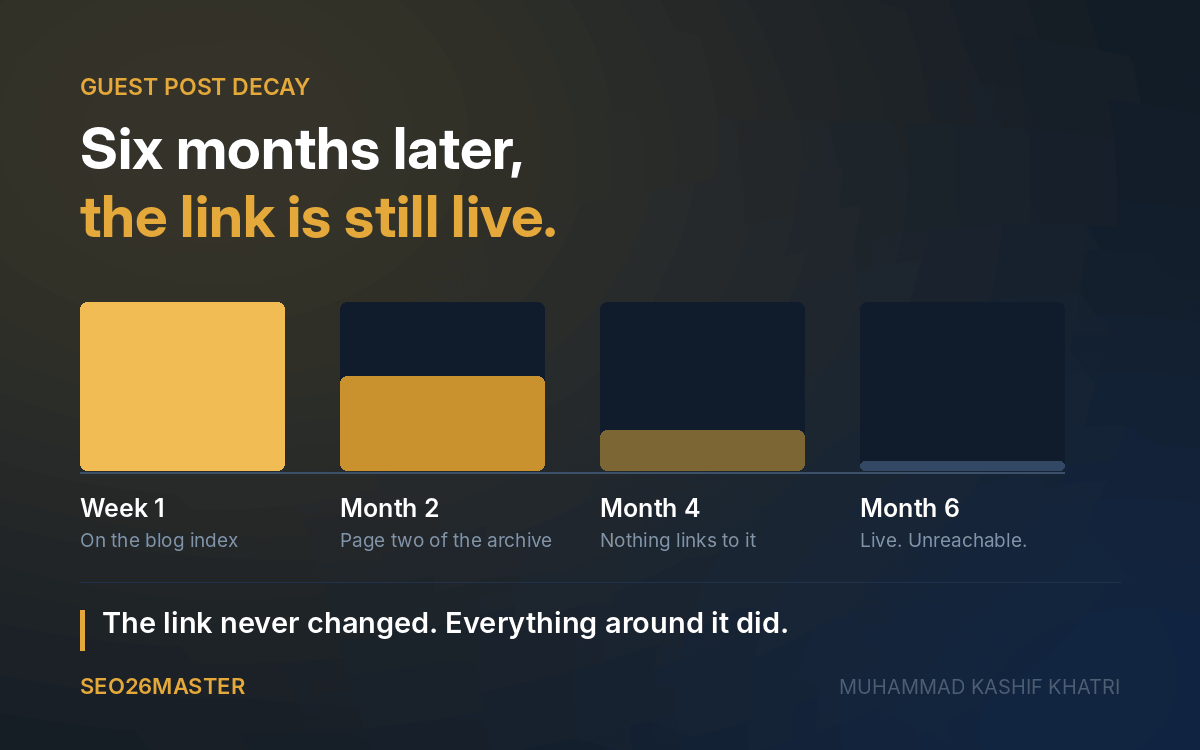
Week one. The article is on the blog index and in the recent posts box. It may go out in a newsletter. People who read the site see it.
Month two. Four or five newer posts have pushed it off the front page. It is now on page two of the archive.
Month four. It is on page five. The only thing on the site still pointing at it is archive pagination, which most readers never open.
Month six. Nothing links to it. It is live, it returns a 200, it still carries your link, and nobody has visited it in weeks.
Your link did not change. Everything around it did.
Why does losing those links stop the page from working?
The usual explanation is that a page with no internal links does not get crawled. That is close enough to be useful and wrong enough to be worth correcting, including by people who sell links for a living.
Google's crawl budget documentation names three things that shape how often a URL gets recrawled: perceived inventory, popularity, and staleness. Popularity is described as URLs that are frequently visited across the internet being crawled more often so they stay fresh. Internal linking is not named as a factor anywhere in that document.
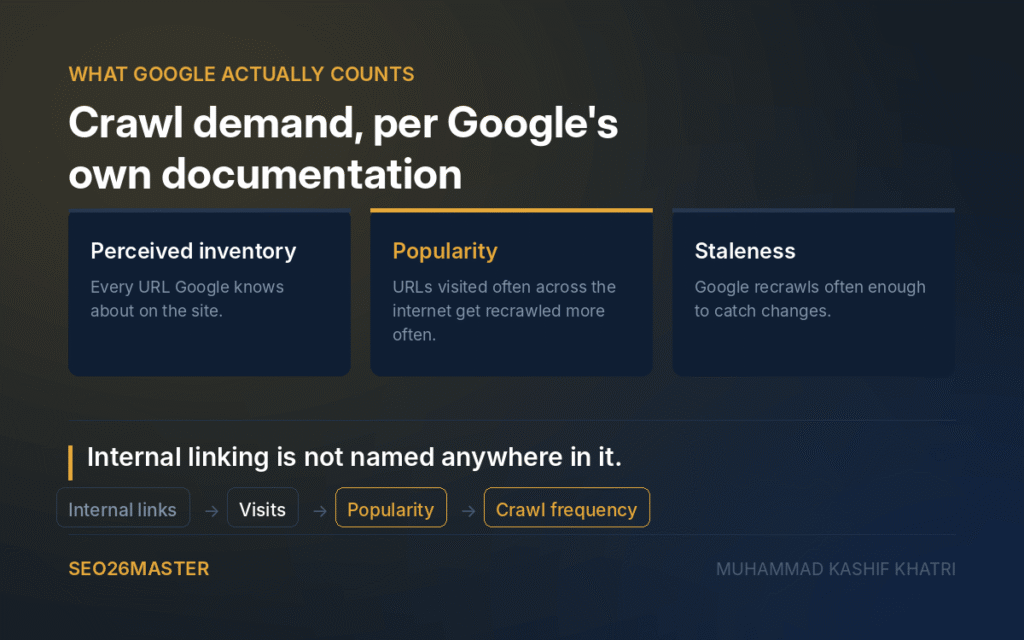
That distinction changes what you are buying. Internal links are not a signal Google counts directly. They are one of the mechanisms by which a page keeps getting visited. When the links go, the visits go, and crawl frequency follows the visits rather than the links.
The published timings fit this. At Search Central Live, Gary Illyes gave the typical time to refresh a known URL as around 30 days. The slowest case he gave was weeks to never.
Never is the word worth sitting with. A page that nothing points at and nobody reaches can fall out of the refresh cycle entirely while remaining perfectly live.
Is my guest post now an orphan page?
An orphan page is one that nothing on its own site links to. Most writing about them is aimed at site owners cleaning up their own architecture. Almost none of it is written for the person who paid for a page sitting on somebody else's site.
The scale is easier to see with numbers. In one site analysis published by Botify, Google was crawling roughly 800,000 orphan URLs against about 300,000 pages that were actually in the site's structure. Those orphans were more than 70% of what Google explored and produced 5% of organic visits. The pages inside the structure were 30% of the total and produced the other 95%.
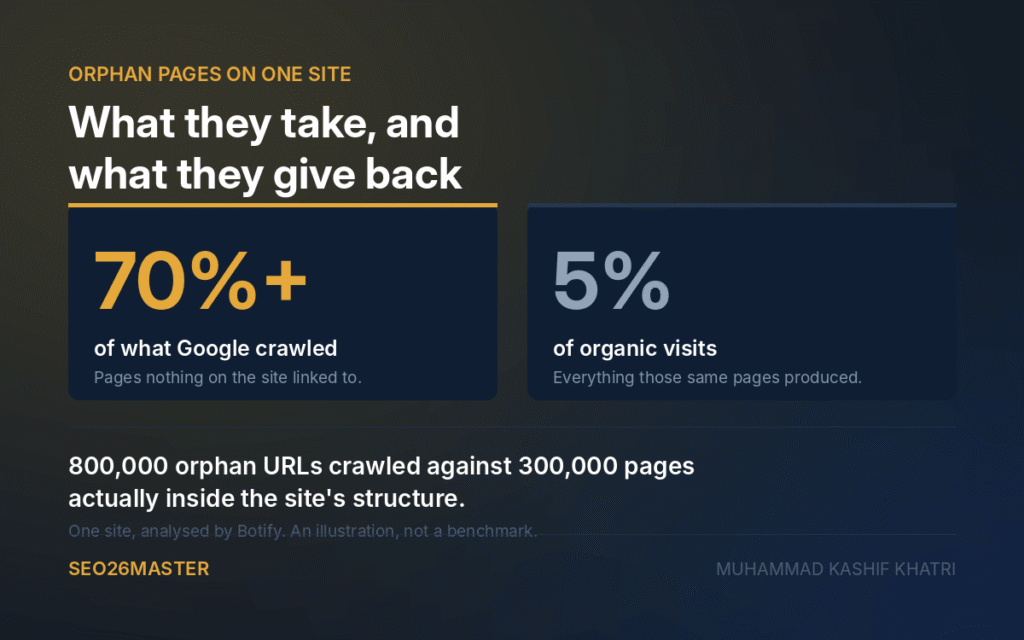
That is one site, so treat the ratio as an illustration rather than a benchmark. The direction is the part that holds: a large share of what gets crawled on a site can be pages that nothing points at, and those pages do very little.
Worth noting that Botify draws a distinction most link buyers never consider. An orphan returning a 404 or 410 is expected, because the page was meant to go. An orphan still returning a 200 is unexpected, because it is live and unreachable at the same time.
That second category is where most guest posts end up.
How to check a placement you already own
Three checks, at three levels of effort. None of them needs a paid tool.
Two minutes, no tools at all. Open the site's homepage and try to reach your article by clicking only. No search box, no URL bar, no Google. If you cannot get there in three clicks, neither can a reader who does not already know it exists.
Ten minutes, Screaming Frog free version. The free tier crawls 500 URLs, which covers most blogs. Crawl the host site, find your article in the list, and open the Inlinks tab at the bottom of the screen. That tab shows every page on the site that links to it. If the only entries are archive pagination and a tag page, you have your answer in writing.
One minute, before you buy anything else. Ask the seller for a post they placed for a different client six months ago. Then run the two checks above on that page instead of yours. What happened to their last client's placement is a reasonable forecast of what will happen to yours.
That third one is the only check on this list that changes an outcome rather than explaining one. Most sellers will give you the link. The ones who will not have told you something.
What to do if you already own one
The honest answer is that the options are limited, and anyone telling you otherwise is selling something.
You can ask the site to link to it from a page that still gets traffic. Some will, particularly if the piece is genuinely useful to their readers. Most will not, because it is work with no benefit to them.
You can point links at it yourself, which usually costs more than the original placement and rebuilds exactly the problem you are trying to solve.
Or you can write it off and change what you buy next. That is the one that actually works, and it is why the check before you buy matters more than any repair after.
One thing this does not establish
This explains why a placement stops being crawled. It does not prove that your specific placement stopped working for this reason, and it does not quantify how much ranking value you lose when it happens. Nobody has published that number credibly, and I would be suspicious of anyone who offers you one.
What it does give you is something to check rather than something to assume. A live link on a page nothing reaches is a different asset from a live link on a page people still arrive at, and the tools in front of you will not tell them apart.
I check the page before I recommend a site, which is also why I turn down more sites than I recommend. If you want that applied to a campaign rather than a single placement, that is what my guest post campaigns cover.
Related: Why guest posts get rejected, from the editor's side
Muhammad Kashif Khatri is an editor at ILLUMINATION and four other Medium publications, and reads submissions every week.
Sources
Leave a Reply